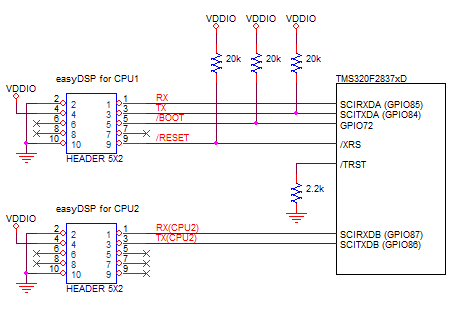
Defino series TMS320F2837xD check below three pins at the reset to decide the booting mode.
|
MODE |
GPIO72 | GPIO84 | /TRST |
Boot mode |
| Mode EMU | X | X | 1 | Emulation Boot |
| Mode 0 | 0 | 0 | 0 | Parallel I/O |
| Mode 1 | 0 | 1 | 0 | SCI (RAM boot) |
| Mode 2 | 1 | 0 | 0 | Wait Boot Mode |
| Mode 3 | 1 | 1 | 0 | Get Mode (factory default = boot to flash) |
easyDSP uses two kinds boot mode. SCI boot mode
for RAM booting, GetMode boot mode for flash rom booting.
Below connection is recommended between easyDSP and
MCU.
Note
that
GPIO84/85 should be used for SCIA. Please
check 'How to use different port ?' session in case external memory
interface is necessary.
You need to use two
easyDSP pods to communicate with both CPU1 and CPU2.
one easyDSP
connected to CPU1 should
use SCI-A (GPIO84/85 fixed).
The other easyDSP connected to CPU2 can use either SCI-B,
SCI-C or SCI-D but easyDSP recommends to use SCI-B GPIO 87/86 as default in its
source file (easy28x_DriverLib.c or easy28x_bitfield.c)
.
If another GPIO port is required in
your system, please change the hardware connection and modify the easyDSP source
file (in the function of easyDSP_SCI_Init) accordingly by yourself.
-
Factory default setting is assumed (Don't change it)
- power pin (#4) of
easyDSP 5x2 header should be connected to 3.3V