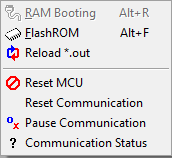
RAM Booting menu
This menu is not supported.
Flash ROM menu
It programs onchip flash of MCU with user program.
Flash programming is available only for F29H85x, CPU1 and CPU2 and CPU3, main flash, bank mode 0 and 2 and device life cycle HS-FS.
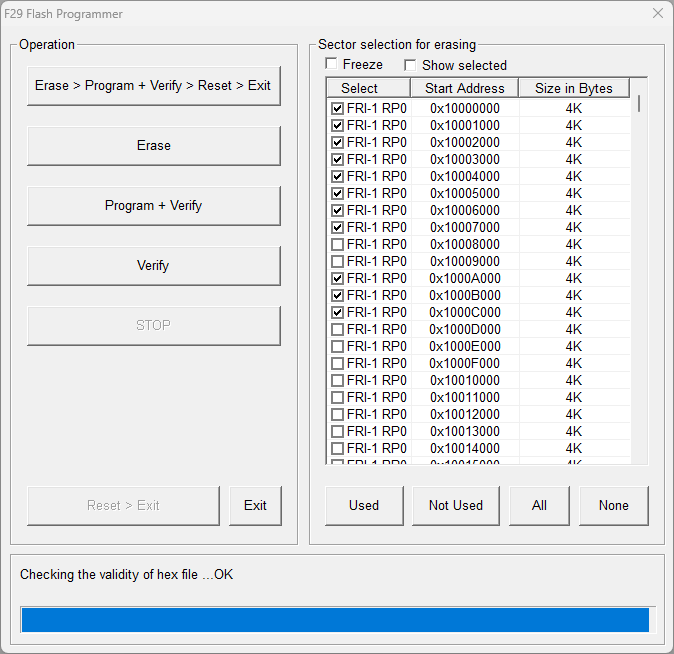
When clicked, the monitoring of easyDSP is temporarily paused and dialog will be present as below.
Please follow below sequence.
step 1 : Select the flash sector to be erased. Use 'All', 'None', 'Used', 'Not Used' buttons. Or click the checkbox of sectors.
All the sectors used in the user program are selected with 'Used' button. The other way around with 'Not used' button.
'Freeze' checkbox disables the sector selection. 'Show selected' shows only selected sectors in the list.
step 2 : When the buttons (Erase, Program+Verify, Verify) are clicked first time, the flash loader (secondary bootloader to program flash) is downloaded to MCU after reset.
step 3 : Execute necessary flash actions. When programming, auto generated ECC is used.
step 4 : Click 'Reset>Exit' button when exiting this dialog box. It makes MCU reset and user program start.