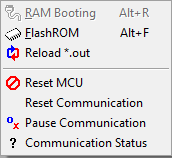
RAM Booting menu
This menu is not supported.
Flash ROM menu
NOTE : this menu is working only when EZ_BOOTLOADER_USE is defined as 1 in the easyS32**.h file. For detailes, refer to this page.
It programs onchip flash of MCU with user program. During this operation, the monitoring of easyDSP is temporarily paused.
Note that you have to disable any flash related protection feature in the MCU while using this menu.
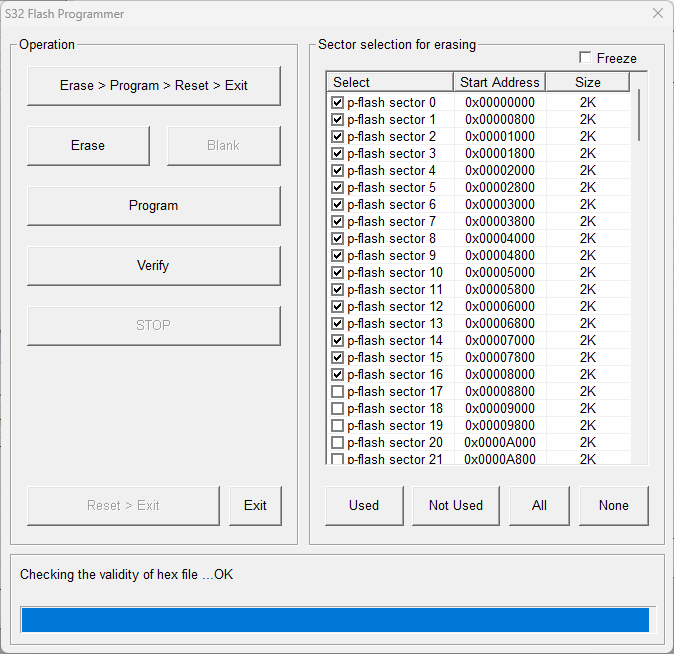
step 1 : Select the flash sector to be erased. Use 'All', 'None', 'Used', 'Not Used' buttons. Or click the checkbox of sectors.
All the sectors used in the user program are selected with 'Used' button. The other way around with 'Not used' button.
Freeze checkbox disables the sector selection.
step 2 :When the buttons (Erase, Program, Verify) are clicked first time, MCU enters to bootloade (easyDSP_boot() function) after reset.
step 3 : Execute necessary flash actions. 'Blank' button is disabled.
step 4 : Click 'Reset>Exit' button when exiting this dialog box. It makes MCU reset and user program starts.
Note :
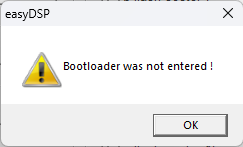
To program flash, the bootloader should be provided since there is no ROM bootloader in this MCU. The bootloader easyDSP provides is the function (name : easyDSP_boot) and it resides in the user program. Therefore it can program flash only when it is already programmed in the flash. In case flash is empty or flash doesn't have easyDSP bootloader, you can't enter into the bootloader and will see the message below. In this case, you have to use the debugger to program flash. And in same principle, you have to use debugger to program easyDSP bootloader into flash at the beginning.