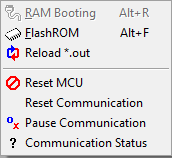
RAM Booting menu
This menu is not supported.
Flash ROM menu
NOTE : this menu is working only when EZ_BOOTLOADER_USE is defined as 1 in the easyUCD.h file. For detailes, refer to this page .
It programs onchip flash of MCU with user program during its development only when program flash module 0 is located at the address 0.
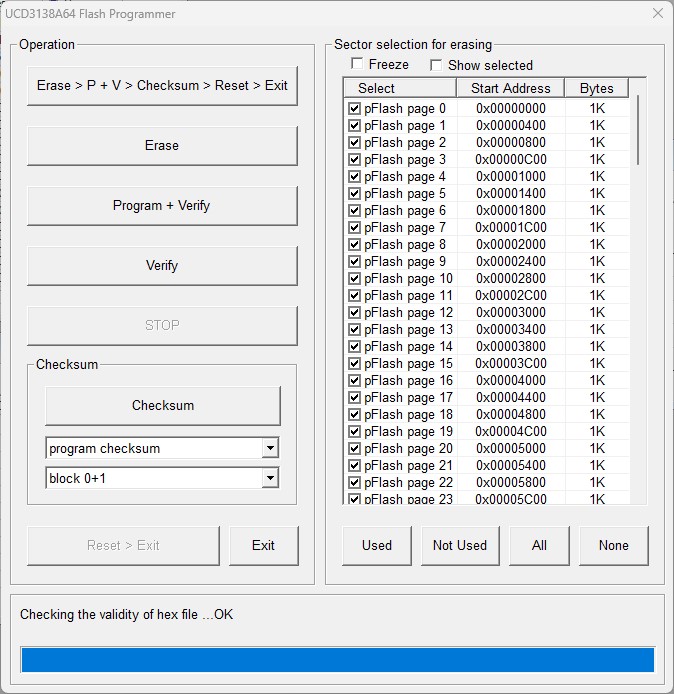
When clicked, the monitoring of easyDSP is temporarily paused and dialog will be present as below.
Please follow below sequence.
step 1 : Select the flash page to be erased. Use 'All', 'None', 'Used', 'Not Used' buttons. Or click the checkbox of sectors.
All the sectors used in the user program and checksum are selected with 'Used' button. The other way around with 'Not used' button.
'Freeze' checkbox disables the sector selection. 'Show selected' shows only selected sectors in the list.
step 2 : When the buttons (Erase, Write, Verify, Checksum) are clicked first time, MCU is reset and gets into the easyDSP provided bootloader.
Checksum button programs checksum to the selected block.
Checksum value to be written is calculated on the actual flash data. So this action should follow the flash programming.
Also the flash location for checksum should be erased before its writing. 'Used' button selects the flash sector for checksum location too.
step 3 : Execute necessary flash actions by clicking buttons.
You can execute all actions by clicking 'Erase > P+V > Checksum > Reset > Exit' button.
step 4 : Click 'Reset>Exit' button when exiting this dialog box. It makes MCU reset and user program start.
Your caution is required :
1. The bootloader easyDSP provides is the function (name : easyDSP_boot) and it resides in the user program. Therefore it can program flash only when it is already programmed in the flash. In case flash is empty or flash doesn't have easyDSP bootloader, you can't enter into the bootloader. In this case, you have to use the debugger (/w PMBUS or Jtag) to program flash including checksum. And in same principle, at the very beginning, at least once, you have to use debugger to program flash and checksum.
2. The bootloader could not work if some malfunction happens during flash programming operation. For example, there is no bootloader available if programming flash fails after erasing flash. In this case, you should use debugger to program flash.